

Upgrading from Classic Dashboards to V2.0
To enable the gradual migration of Dashboards, Anodot allows Classic and V2.0 Dashboards to co-exist. However, we recommend you migrate specific Dashboards from Classic to V2.0, as and when possible, to take advantage of the new Dashboard functionality.
To migrate a Dashboard to V2.0
-
In the main Dashboards screen, locate a Classic Dashboard you own.
-
Click
on the Dashboard you want to convert, and then Convert to New Dashboard.
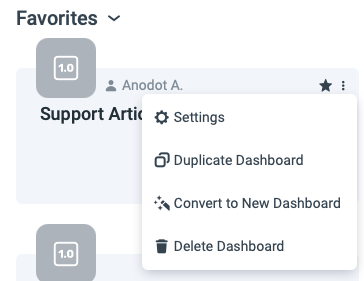
We recommend you first duplicate your Dashboard (by selecting the Duplicate Dashboard option) to ensure you have a backup copy of the Dashboard.
-
In the displayed dialog, click Convert this dashboard. Anodot automatically converts the Dashboard to the V2.0 format.
-
Test the newly created Dashboard. Note that because the Classic and V2.0 Dashboards do not have an identical feature-set, the migration might not be 1:1.
You can select to Revert to Classic from an upgraded Dashboard. However, if you duplicated the Dashboard in the previous step, there should be no reason to.
Updated over 1 year ago