

Closing Alerts
Closing Anomaly alerts
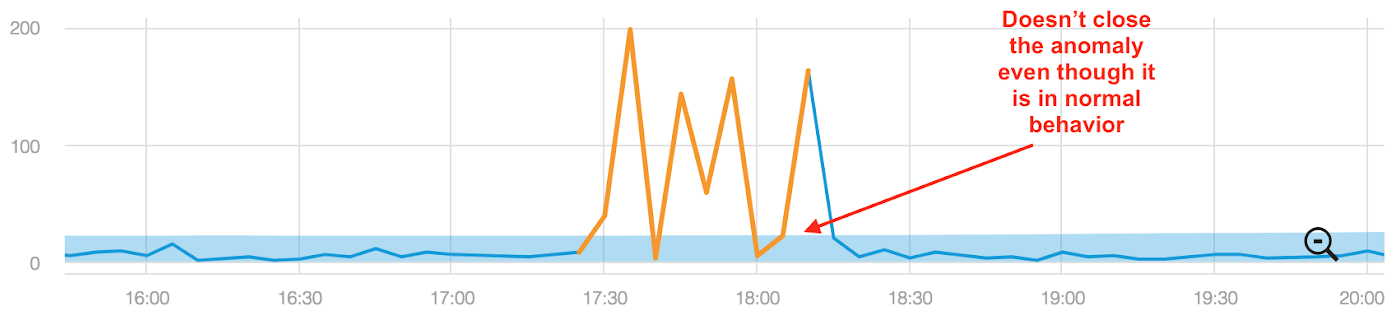
Anodot defines an alert closed for Anomaly alerts after at least 3 consecutive data points are within the baseline area. An Alert close notification is automatically triggered.
In the example below, although normal behavior returns just before 17:30, the system does not close the anomaly until approximately 18:15, until 3 consecutive data points are within the baseline area. See the number of data points needed to close an anomaly per time scale in our facts and figures doc.
Note that all metrics included in the alert will be in one of the following states:
- They have resumed their normal state.
- They have timed-out according to the metric timeout period values in the table below (when the metric stops transmitting):
Time Scale Timeout 1 minute 5 hours 5 minutes 10 hours 1 hour 24 hours 1 day 4 days 1 week 28 days
Closing Static and No Data alerts
Anodot defines an alert closed for Static and No Data alerts after a metric timeout.
Metric timeouts occur when a metric breaches a defined threshold and remains in breach while ceasing to transmit. In turn, this can leave the alert open for long periods of time. Anodot's metric timeout mechanism resets that metric, ensuring the alert can be closed.
Timeout periods for Static and No Data alerts are as follows:
- 1 minute, 5 minutes - 7 days
- 1 hour, 1 day, 1 week - 30 days
Note the following closure scenarios for Static alerts:All metrics included in a Static alert will be in one of the following states:
- They have returned to their normal ranges.
- They timed out due to a long threshold breach period.
- They timed out due to a threshold breach followed by No Data state beyond the timeout period.
Updated 24 days ago