

Selectors
A Selector is a user-defined filter for quickly filtering metrics in Dashboard charts and meters.
- Multiple Selectors can be set for a Dashboard.
- Selectors can be further refined by adding a Dependency Group. which exclude values that are not required.
- Only charts and meters which include the Selector in the expression are filtered.
Selectors Operators
Selector RegEx uses the following operators:
| .* | Any string, length 0 to entire string |
| ? | Any single character |
| | | OR between multiple expressions |
| & | AND between multiple expressions |
| ~ | NOT on the encapsulated expression following the ~ |
| () | Encapsulated expressions |
Examples
-
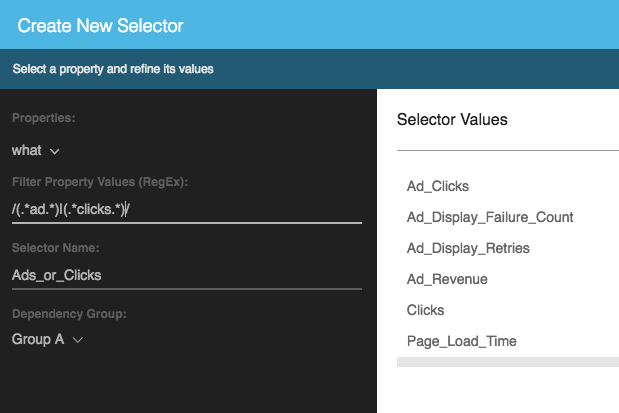
Get all what values that contain the substring ad somewhere OR the substring clicks:
-
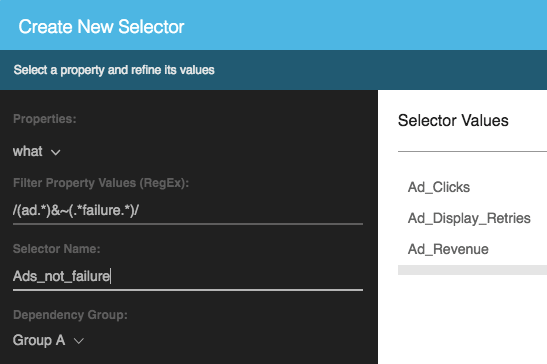
Get all what values that contain the substring ad at the beginning of the string, but not the substring failure:
Using Selectors to Filters Charts or Meters
To filter a chart or meter using a Selector:
- Create a Selector. [See Creating a Selector]
- Add the Selector to an Expression. [See Adding a Selector to an Expression]
- Use the Selector to filter Dashboard tiles. [See Viewing Dashboard Tiles - Filtering Dashboard Tiles by Selectors]
Changing the value of a Selector updates all charts that use the Selector.
Updated over 1 year ago
Did this page help you?