

Databricks
gfgbg
This article describes how to collect data using Databricks in 3 simple steps:
- Provide a token and JDBC access to Anodot from Databricks.
- Create an Anodot Data Source to connect to Databricks.
- Choose the Databricks table or compose a query to get the data.
Preparation in Databricks
Follow the Databricks documentation to:
- Enable Token Based Authentication.
- Generate a token.
- Configure JDBC.
The token and the JDBC path will be used when creating the data source in Anodot.
Creating a Databricks Data Source
-
In the Navigation Panel, go to Integrations > Catalog.
-
Use the Search box OR click the Databases filter to locate the data source.
-
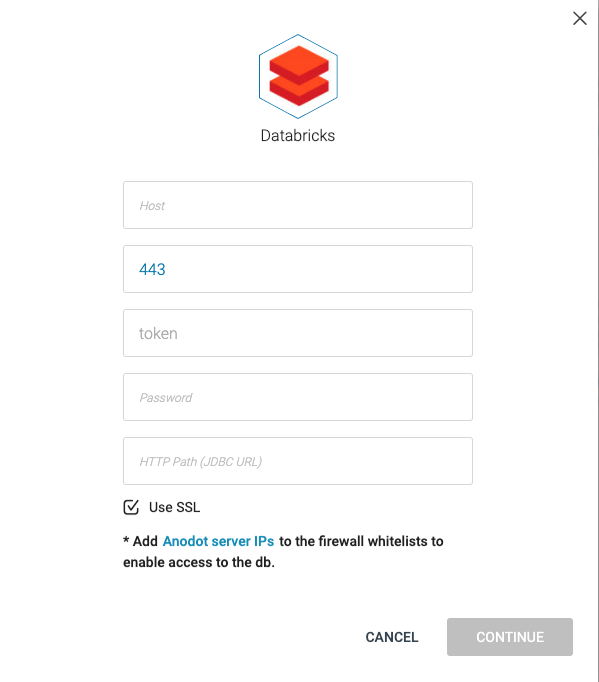
Hover over the Databricks tile, and click Start. The Databricks dialog is displayed, as shown below.
-
Enter your workspace URL in the Host field.
-
Either enter your Databricks port number or leave the default port number [443] as-is.
-
The user name field is pre-filled with token to enable API access.
-
Enter the token you have generated in Databricks in the Password field.
-
Enter the HTTP Path you have configured in Databricks in the HTTP Path.
-
Enable / disable Use SSL. The default is Use SSL enabled.
-
Click CONTINUE to open the Stream Query window.
To create a Databricks stream query, see Creating a Stream Query from a Database .
Updated over 1 year ago
What’s Next
See Also