

Absolute
| Description | Returns the absolute value of each sample in the time-series input. |
| Input | Time Series: Multiple (Single or multiple time-series) |
| Parameters | None |
| Output | Transformed Time Series: Multiple |
| Available in | Alerts, Composites, Dashboards |
Usage Example
The Absolute function is useful when you want to monitor only the difference between two metrics.
A retail organization wants to verify that inventory data produced by their internal system matches the sales reports they are getting from their partners. If they subtract one from the other, the result should be very close or identical. If there is a significant difference between the two, the system will identify an anomaly and trigger an alert.
How to set it up?
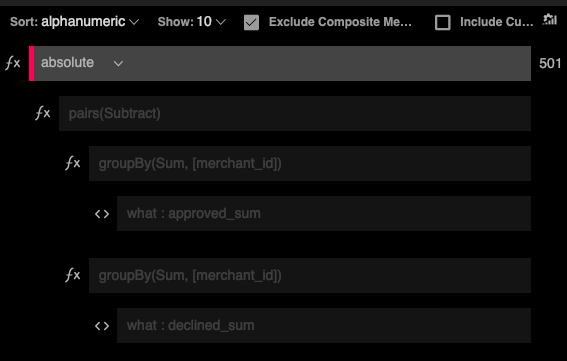
Step 1: Use the pairs function to subtract one set of metrics from the other.
Step 2: Add the Absolute function on top of the pairs function.
Updated over 1 year ago
Did this page help you?