

Introducing the Anodot UI
After logging in to Anodot, the Alert Console is displayed by default; from here you can access any part of the Anodot product from the main components of the Anodot UI, as described below.
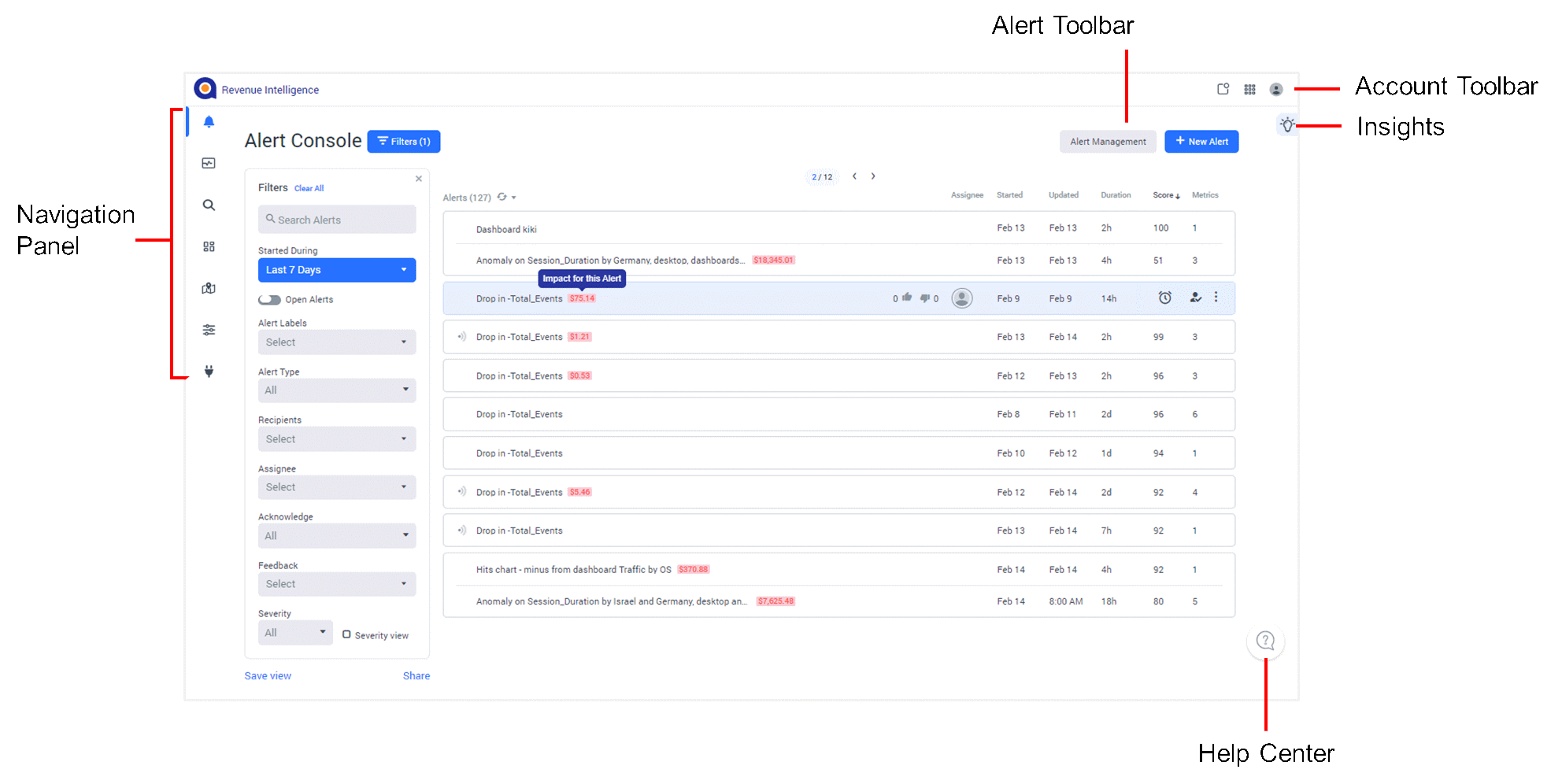
Navigation Panel |
The Navigation panel, located on the left of the UI, provides access to the main Anodot monitoring tools: Metrics Search, Alert Console, Anomalies, Dashboards, and Integrations, which include the Anodot Catalog via which you can manage streams and channels. You can also define how the monitoring is actually managed, including the management of users and groups, and alerts. See the section below for further information. |
Alert Toolbar |
The Alert toolbar, displayed only in the Alert Console, provides access to the Alerts Management page. You can also create a new alert on-the-fly. |
Account Toolbar |
The Account toolbar provides access to notifications and your user account settings, including API tokens, authentication, and time zone settings. You can also switch between Anodot apps by clicking The available apps include Anodot Cost Intelligence and Payments Monitoring. |
Insights |
Click the lightbulb icon to display the Insights panel; this panel provides an at-a-glance overview of the alerts within the last 7 / 14 / 30 days. |
Help Center |
Click this icon to access support articles, getting started tutorials, and a feedback option. |

Navigation Panel
The Anodot Navigation Panel, displayed to the left of the screen, provides access to all of the monitoring and management tools within Anodot. A partial list of icons and menu options might be displayed depending on the user role; see Roles and Permissions.
 | Alerts Console | Manage your alerts, including acknowledging, investigating, and tuning alerts. |
 | Anomalies | View, access, and create anomaly dashboards (Anoboards). |
 | Metrics Search | View and manage Metric Expressions. |
 | Dashboards | View, create, and import Dashboards. |
 | Management | Define management settings, including users and groups and alerts. |
 | Integrations | Manage Data Sources (and their streams) and Channels, including the Anodot Catalog. |
Updated over 1 year ago