

Oracle Database
This article describes the main steps required to create the Oracle Database data source and stream query.
Creating an Oracle Database data source
-
In the Navigation Panel, go to Integrations > Catalog.
-
Use the Search box OR click the Databases filter to locate the data source.
-
Hover over the Oracle Database tile, and click Start. The Oracle dialog is displayed, as shown below.
Note: If the data source has already been used, a dialog is displayed in which you can select from one of the listed sources. Alternatively, create a new source by clicking Add a new source.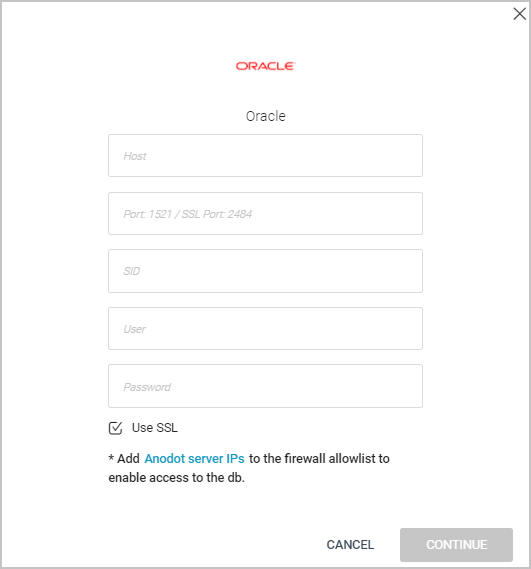
-
Enter your Host .
-
Either enter your Oracle port number or SSL port [or leave the default port numbers. (1521/2484]
-
Enter a Service ID (SID).
-
Enter a user account name.
-
Enter a password.
-
Select/clear the Use SSL checkbox. By default is is selected.
-
Add an Anodot server IP to your firewall's allowlist. See Allowlist Anodot Servers .
-
Click CONTINUE to open the Stream Query window.
To create an Oracle Database stream query, see Creating a Stream Query from a Database .
Updated over 1 year ago
What’s Next
See Also