

Enable Reading from the Kinesis Stream
A preliminary step to create an integration with your Kinesis stream, is to allow Anodot to read from the stream.
Follow these steps to configure read permissions in the Kinesis stream:
-
In your AWS console, create a new role called "anodot-kinesis-reader"
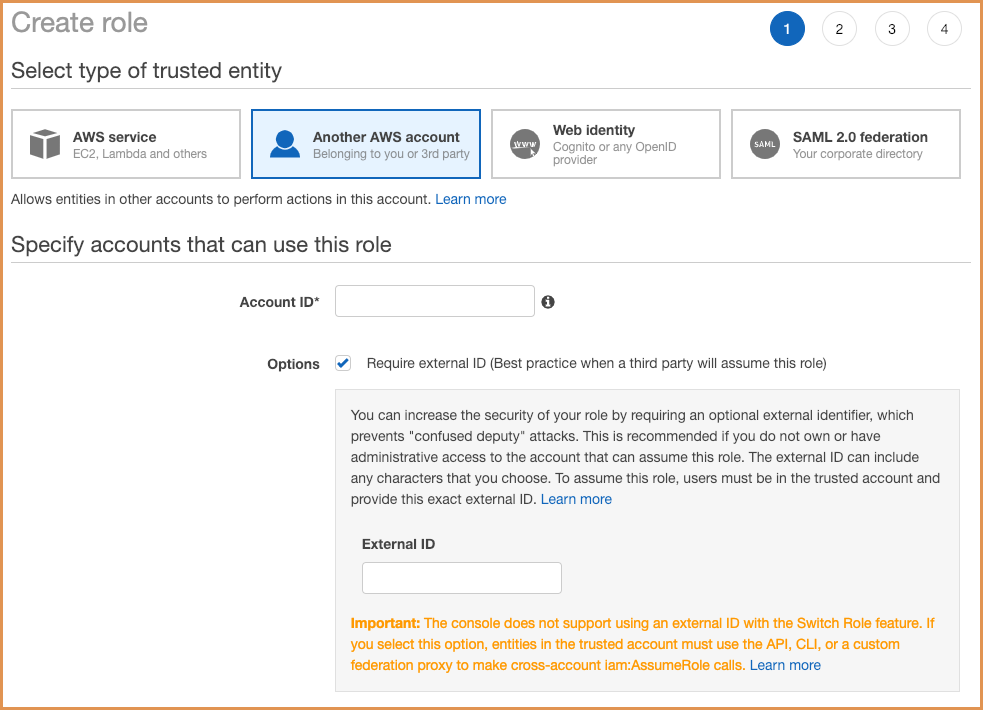
-
Copy the External ID generated by Anodot to the role's trust policy.
-
"anodot-kinesis-reader" Role's Trust policy:
{
  "Version": "2012-10-17",
  "Statement": [
    {
      "Effect": "Allow",
      "Principal": {
        "AWS": "arn:aws:iam::340481513670:root"
      },
      "Action": "sts:AssumeRole",
      "Condition": {
        "StringEquals": {
          "sts:ExternalId": "<REPLACE_WITH_EXTERNAL_ID_FROM_ANODOT>"
      	}
      }
    }
  ]
}- "anodot-kinesis-reader" Role's permission policy:
{
  "Version": "2012-10-17",
  "Statement": [
    {
    "Sid": "VisualEditor0",
    "Effect": "Allow",
    "Action": [
      "kinesis:ListStreams",
      "kinesis:ListShards",
      "kinesis:GetShardIterator",
      "kinesis:GetRecords",
      "kinesis:DescribeStream",
    ],
    "Resource": "*"
    }
  ]
}- Copy the "anodot-kinesis-reader" Role's ARN from the AWS console to the Role ARN field in the new Kinesis source modal:
arn:aws:iam::<YOUR_ACCOUNT_ID>:role/anodot-kinesis-readerUpdated over 1 year ago
Did this page help you?