

Amazon Timestream
The Amazon Timestream Collector enables you to stream Amazon Timestream time-series data records using JDBC into Anodot.
Creating an Amazon Timestream data source
-
In the Navigation Panel, go to Integrations > Catalog.
-
Use the Search box OR click the Databases filter to locate the data source.
-
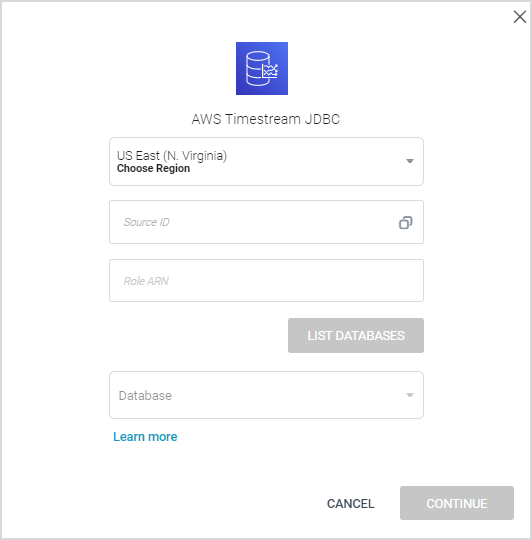
Hover over the Amazon Timestream SQL tile, and click Start. The following dialog is displayed:
-
Define the following:
- Region: Select the relevant region.
- Source ID: Use the external ID in the trusted organization.
- Role ARN: Create the role in AWS and copy the role ARN here.
-
Click LIST DATABASES and then select the relevant database from the dropdown list.
-
Click CONTINUE.
Creating an Amazon Timestream stream query
If you have just created an Amazon Timestream data source, skip to step 3.
- In the Sources page (accessed by clicking Integrations > Sources in the Navigation Panel), filter the list of streams to find the source for which you want to create a stream query.
Note: The streams associated with that source are displayed. If the streams panel is empty, no stream queries exist for that source. - Hover over the relevant data source, and click + New Stream. The Stream Query page is displayed.
- Define your quey settings as required. For further information, see Creating a Stream Query from a Database .
Updated over 1 year ago
Did this page help you?