

TimeShift
| Description | Shifts each data point by the given period. |
| Input | Time Series – multiple (Single or multiple time series) |
| Parameters | Time Shift | Mandatory, relative time value |
| Time Shift Scale | Mandatory, scale (Minutes, Hours, Days) | |
| Output | Transformed Time Series: Multiple |
| Available in | Dashboards |
Usage Example
The TimeShift function shifts the metric’s data timestamps to the right (into the "future"). This enables the user to inspect a specific time range in the past, together with another time range.
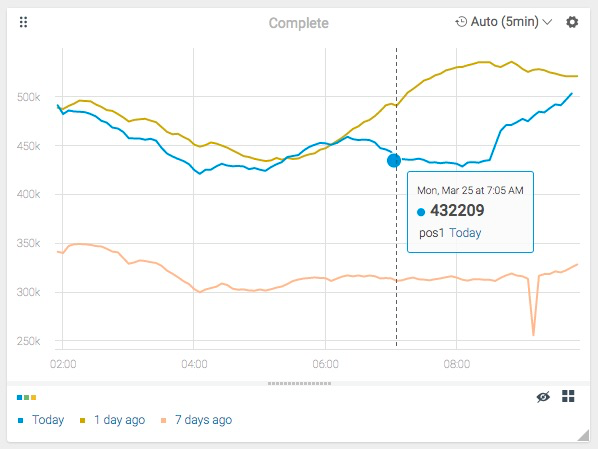
For example, the function can be used to inspect how a certain metric behaved today, compared with data from yesterday and 7 days ago. The following chart was created using three separate expressions, two of them time-shifted by 1 day and 7 days respectively:
- This function is available for display purposes only, and cannot be used in alerts.
- The number of intervals that the data is shifted is specified using a parameter. For example, if you choose 1 day, the function shifts all data points one day into the relative future. Consequently, a value with a timestamp of 2 days ago will be displayed in the graph with yesterday’s date, a value with a timestamp of 1 day ago will be displayed with today’s date, and so on.
Updated over 1 year ago
Did this page help you?