

AWS Cost Monitoring
This article describes the main steps required to create the AWS Cost Monitoring data source and stream query:
- Providing read access for Anodot using a cross-account AWS role (see here for more information)
- Creating an AWS Cost Monitoring Data Source
- Creating an AWS Cost Monitoring Stream Query
Creating an AWS Cost Monitoring Data Source
-
In the Navigation Panel, go to Integrations > Catalog.
-
Use the Search box OR click the Business Packages filter to locate the data source.
-
Hover over the AWS Cost Monitoring tile, and click Start.
*Note: If the data source has already been used, a dialog is displayed in which you can select from one of the listed sources. Alternatively, create a new source by clicking Add a new source. -
In the displayed dialog, select the bucket's region, enter the bucket name, and enter a folder name (optional).
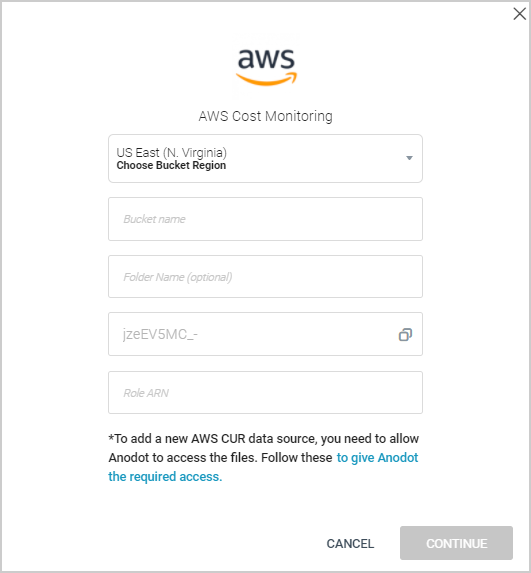
-
Setup the AWS cross account role (as described here) to enable anodot.com to access your CUR bucket.
-
Click CONTINUE to display the Stream Query.
Creating an AWS Cost Monitoring Stream Query
-
In the Sources page (accessed by clicking Integrations > Sources in the Navigation Panel), choose the AWS Cost Monitoring source for which you want to create a stream query.
Note: The streams associated with that source are displayed. If the Streams panel is empty, no stream queries exist for that source. -
Hover over the relevant data source, and click + New Stream. The Stream Query page is displayed.
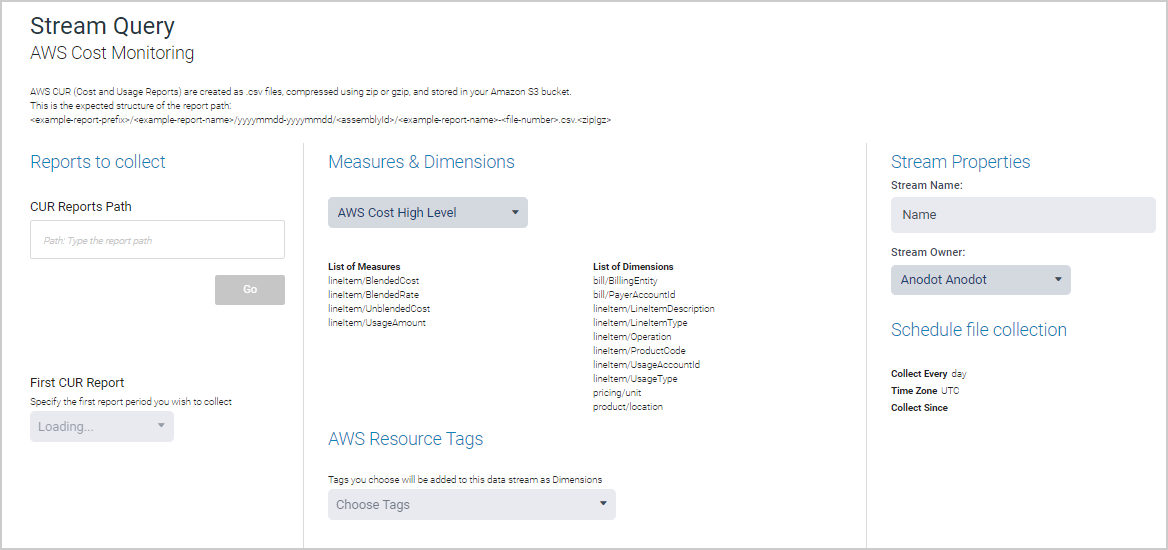
-
In the Stream Properties section, set a name and owner for the stream.
-
In the CUR Reports Path field in the Reports to collect section, enter the path leading to the required CUR report folder and click Go.
-
In the First CUR Report field, select the first billing period you want to collect.
-
In the Measures & Dimensions section, choose the relevant template from the dropdown list of templates; measures and dimensions will be added based on the selected template.
-
In the AWS Resource Tags section, choose the relevant resource tags to use from the list of tags included in your CUR file.
-
Click NEXT. The Stream Table is displayed, as described in Stream Tables .
Updated over 1 year ago